
Aruba 510 Series
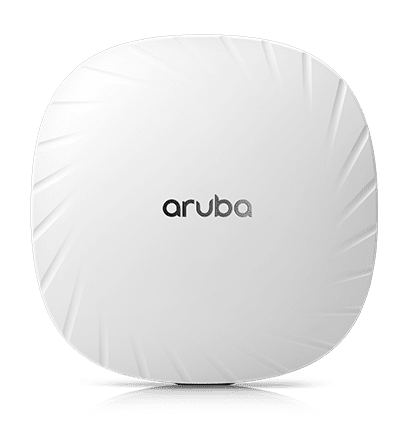
High performance 802.11ax enterprise access points for campus deployments
The Aruba 510 series access points with 802.11ax (Wi-Fi 6), combined with Aruba intelligent software innovations, are designed to deliver high performance connectivity for mobile and IoT devices in any environment.
The 510 series is designed to simultaneously serve multiple clients and traffic types in dense environments, and boosts overall network performance by up to 4X versus 802.11ac APs.
In addition to the benefits that 802.11ax delivers, the 510 series provide differentiated capabilities which include AI-powered Wi-Fi performance assurance, always-on connectivity, and WPA3 certified security. Green AP mode offers AI-powered energy savings of up to 70%.
 |  |  | ||||||||||
High efficiency | Unsurpassed client performance | IoT ready access points | ||||||||||
| 802.11ax OFDMA and MU-MIMO efficiently and simultaneously service multiple clients to provide a good experience in high density environments. | Aruba’s ClientMatch feature intelligently groups Wi-Fi 6 clients onto the best AP’s to leverage 802.11ax multi-user capabilities. | Leverage your Wi-Fi infrastructure to support Zigbee and Bluetooth devices and applications. | ||||||||||
| HARDWARE VARIANTS |
|---|
| AP-514: External antenna modelsAP-515: Internal antenna models |
| WI-FI RADIO SPECIFICATIONS |
|---|
| AP type: Indoor, dual radio, 5GHz 802.11ax 4×4 MIMO and 2.4GHz 802.11ax 2×2 MIMO5GHz radio:Four spatial stream Single User (SU) MIMO for up to 4.8Gbps wireless data rate to individual 4SS HE160 802.11ax client devices (max)Two spatial stream Single User (SU) MIMO for up to 1.2Gbps wireless data rate to individual 2SS HE80 802.11ax client devices (typical)Four spatial stream Multi User (MU) MIMO for up to 4.8Gbps wireless data rate to up to four 1SS or two 2SS HE160 802.11ax DL-MU-MIMO capable client devices simultaneously (max)Four spatial stream Multi User (MU) MIMO for up to 2.4Gbps wireless data rate to up to four 1SS or two 2SS HE80 802.11ax DL-MU-MIMO capable client devices simultaneously (typical)2.4GHz radio:Two spatial stream Single User (SU) MIMO for up to 575Mbps wireless data rate to individual 2SS HE40 802.11ax client devices or to two 1SS HE40 802.11ax DL-MU-MIMO capable client devices simultaneously (max)Two spatial stream Single User (SU) MIMO for up to 287Mbps wireless data rate to individual 2SS HE20 802.11ax client devices or to two 1SS HE20 802.11ax DL-MU-MIMO capable client devices simultaneously (typical)Support for up to 256 associated client devices per radio, and up to 16 BSSIDs per radioSupported frequency bands (country-specific restrictions apply):2.400 to 2.4835GHz5.150 to 5.250GHz5.250 to 5.350GHz5.470 to 5.725GHz5.725 to 5.850GHzAvailable channels: Dependent on configured regulatory domainDynamic frequency selection (DFS) optimizes the use of available RF spectrumSupported radio technologies:802.11b: Direct-sequence spread-spectrum (DSSS)802.11a/g/n/ac: Orthogonal frequency-division multiplexing (OFDM)802.11ax: Orthogonal frequency-division multiple access (OFDMA) with up to 16 resource units (for an 80MHz channel)Supported modulation types:802.11b: BPSK, QPSK, CCK802.11a/g/n: BPSK, QPSK, 16-QAM, 64-QAM, 256-QAM (proprietary extension)802.11ac: BPSK, QPSK, 16-QAM, 64-QAM, 256-QAM, 1024-QAM (proprietary extension)802.11ax: BPSK, QPSK, 16-QAM, 64-QAM, 256-QAM, 1024-QAM802.11n high-throughput (HT) support: HT20/40802.11ac very high throughput (VHT) support: VHT20/40/80/160802.11ax high efficiency (HE) support: HE20/40/80/160Supported data rates (Mbps) 1:802.11b: 1, 2, 5.5, 11802.11a/g: 6, 9, 12, 18, 24, 36, 48, 54802.11n (2.4GHz): 6.5 to 300 (MCS0 to MCS15, HT20 to HT40)802.11n (5GHz): 6.5 to 600 (MCS0 to MVC31, HT20 to HT40)802.11ac: 6.5 to 3,467 (MCS0 to MCS9, NSS = 1 to 4, VHT20 to VHT160)802.11ax (2.4GHz): 3.6 to 574 (MCS0 to MCS11, NSS = 1 to 2, HE20 to HE40)802.11ax (5GHz): 3.6 to 4,803 (MCS0 to MCS11, NSS = 1 to 4, HE20 to HE160)802.11n/ac packet aggregation: A-MPDU, A-MSDUTransmit power: Configurable in increments of 0.5 dBmMaximum (aggregate, conducted total) transmit power (limited by local regulatory requirements):2.4 GHz band: +21 dBm (18dBm per chain)5 GHz band: +24 dBm (18 dBm per chain)Note: conducted transmit power levels exclude antenna gain. For total (EIRP) transmit power, add antenna gain.Advanced Cellular Coexistence (ACC) minimizes the impact of interference from cellular networksMaximum ratio combining (MRC) for improved receiver performanceCyclic delay/shift diversity (CDD/CSD) for improved downlink RF performanceSpace-time block coding (STBC) for increased range and improved receptionLow-density parity check (LDPC) for high-efficiency error correction and increased throughputTransmit beam-forming (TxBF) for increased signal reliability and range802.11ax Target Wait Time (TWT) to support low-power client devices 1 Ignoring the impact of proprietary data rate extensions and OFDMA resource units. |
| WI-FI ANTENNAS |
|---|
| AP-514:Four RP-SMA connectors for external dual band antennas (A0 through A3, corresponding with radio chains 0 through 3). Worst-case internal loss between radio interface and external antenna connectors (due to diplexing circuitry): 1.3dB in 2.4GHz and 1.7dB in 5GHz.AP-515:Four integrated dual-band downtilt omni-directional antennas for 4×4 MIMO with peak antenna gain of 4.2dBi in 2.4GHz and 7.5dBi in 5GHz. Built-in antennas are optimized for horizontal ceiling mounted orientation of the AP. The downtilt angle for maximum gain is roughly 30 degrees.Combining the patterns of each of the antennas of the MIMO radios, the peak gain of the effective per-antenna pattern is 3.8dBi in 2.4GHz and 4.6dBi in 5GHz. |
| ADDITIONAL INTERFACES |
|---|
| E0: HPE SmartRate port (RJ-45, maximum negotiated speed 2.5Gbps)Auto-sensing link speed (100/1000/2500BASE-T) and MDI/MDX2.5Gbps speed complies with NBase-T and 802.3bz specificationsPOE-PD: 48Vdc (nominal) 802.3af/802.3at POEE1: 10/100/1000BASE-T Ethernet network interface (RJ-45)Auto-sensing link speed and MDI/MDXLink aggregation (LACP) support between both network ports for redundancy and increased capacityDC power interface: 12Vdc (nominal, +/- 5%), accepts 2.1mm/5.5mm center-positive circular plug with 9.5mm lengthUSB 2.0 host interface (Type A connector)Capable of sourcing up to 1A / 5W to an attached deviceBluetooth 5 and Zigbee (802.15.4) radioBluetooth: up to 8dBm transmit power (class 1) and -95dBm receive sensitivityZigbee: up to 8dBm transmit power and -97dBm receive sensitivityIntegrated vertically polarized omnidirectional antenna with roughly 30 degrees downtilt and peak gain of 3.5dBi (AP-515) or 4.9dBi (AP-514)Visual indictors (two multi-color LEDs): for System and Radio statusReset button: factory reset, LED mode control (normal/off)Serial console interface (proprietary, micro-B USB physical jack)Kensington security slot |
| POWER SOURCES AND POWER CONSUMPTION |
|---|
| The AP supports direct DC power and Power over Ethernet (POE; on port E0)When both power sources are available, DC power takes priority over POEPower sources are sold separately; see the ordering Information section below for detailsWhen powered by DC or 802.3at POE, the AP will operate without restrictionsWhen powered by 802.3af POE and with the IPM feature enabled, the AP will start up in unrestricted mode, but it may apply restrictions depending on the POE budget and actual power. What IPM restrictions to apply, and in what order, is programmable.When powered by 802.3af POE with the IPM feature disabled, the AP operates in power-save mode, and will apply some fixed restrictions:The USB interface and E1 Ethernet port are disabledThe 5GHz radio is restricted to 2×2 operationMaximum (worst-case) power consumption:DC powered: 16WPOE powered (802.3af, IPM enabled): 13.5WPOE powered (802.3at/bt): 20.8WAll numbers above are without an external USB device connected. When sourcing the full 5W power budget to such a device, the incremental (worst-case) power consumption for the AP is up to 5.7W (PoE powered) or 5.5W (DC powered).Maximum (worst-case) power consumption in idle mode: 12.6W (PoE) or 9.7W (DC)Maximum (worst-case) power consumption in deep-sleep mode: 5.9W (PoE) or 1.5W (DC) |
| MOUNTING DETAILS |
|---|
| A mounting bracket has been pre-installed on the back of the AP. This bracket is used to secure the AP to any of the (sold separately) mount kits; see the ordering Information section below for details. |
| MECHANICAL |
|---|
| Dimensions/weight (AP-515; unit, excluding mount bracket):(H) 46mm x (W) 200mm x (D) 200mm (1.8″ x 7.9″ x 7.9″)Weight: 810g (28.5oz)Dimensions/weight (AP-515; shipping):(H) 72mm x (W) 230mm x (D) 220mm (2.8″ x 9.1″ x 9.1″)Weight: 1,010g (35.5oz) |
| ENVIRONMENTAL |
|---|
| Operating conditionsTemperature: 0°C to +50°C / +32°F to +122°FHumidity: 5% to 93% non-condensingAP is plenum rated for use in air-handling spacesETS 300 019 class 3.2 environmentsStorage and transportation conditionsTemperature: -40°C to +70°C / -40F to +158°FHumidity: 5% to 93% non-condensingETS 300 019 classes 1.2 and 2.3 environments |
| RELIABILITY |
|---|
| Mean Time Between Failure (MTBF): 560,000 hrs (64yrs) at +25°C operating temperature. |
| REGULATORY COMPLIANCE |
|---|
| FCC/ISEDCE MarkedRED Directive 2014/53/EUEMC Directive 2014/30/EULow Voltage Directive 2014/35/EUUL/IEC/EN 60950EN 60601-1-1, EN60601-1-2For more country-specific regulatory information and approvals, please see your Aruba representative. |
| REGULATORY MODEL NUMBERS |
|---|
| AP-514: APIN0514AP-515: APIN0515 |
| CERTIFICATIONS |
|---|
| UL2043 plenum ratingWi-Fi Alliance:Wi-Fi CERTIFIED a, b, g, n, acWi-Fi CERTIFIED ax2WPA, WPA2 and WPA3 – Enterprise, PersonalWMM, WMM-PS, Wi-Fi Vantage, W-Fi Agile MultibandWi-Fi Location3Passpoint (release 2)Bluetooth SIGEthernet Alliance (POE, PD device, class 4) 2 May require software update. Certification effort will be kicked off as soon as the Wi-Fi Alliance starts the program.3 Not available initially; will require a software upgrade. |
| MINIMUM OPERATING SYSTEM SOFTWARE VERSIONS |
|---|
| ArubaOS and Aruba InstantOS 8.4.0.0 |
| PRODUCT AND TECHNOLOGY INFORMATION |
|---|
| Aruba 510 Series Data SheetAruba 510 Series Ordering Guide |
| WARRANTY, SUPPORT, AND SERVICES |
|---|
| Warranty: For warranty and support information, visit www.arubanetworks.com/support-services/product-warranties/Service: For support and services information, visit www.arubanetworks.com/support-services/ |
| AIRHEADS COMMUNITY |
|---|
| Learn more about the Airheads Community |
Entre em contato e solicite um orçamento agora!
Precisa comprar, instalar ou migrar seu equipamento ?
Planejamos sua aquisição, instalação, implantação ou migração, para mais informações faça contato com a TND Brasil através do telefone (11) 3717-5537 , e-mail [email protected] ou envie uma mensagem.